Agentic AI in Microsoft 365: Autonomous Sales Agents vs. Human RevOps Teams
Autonomous AI agents are migrating from simple chat assistants to background workers capable of drafting proposals, updating CRM records, and conducting competitive intelligence autonomously.
Autonomous AI agents are migrating from simple chat assistants to background workers capable of drafting proposals, updating CRM records, and conducting competitive intelligence autonomously.
The Direct Answer: What Agentic AI Changes in Enterprise Sales
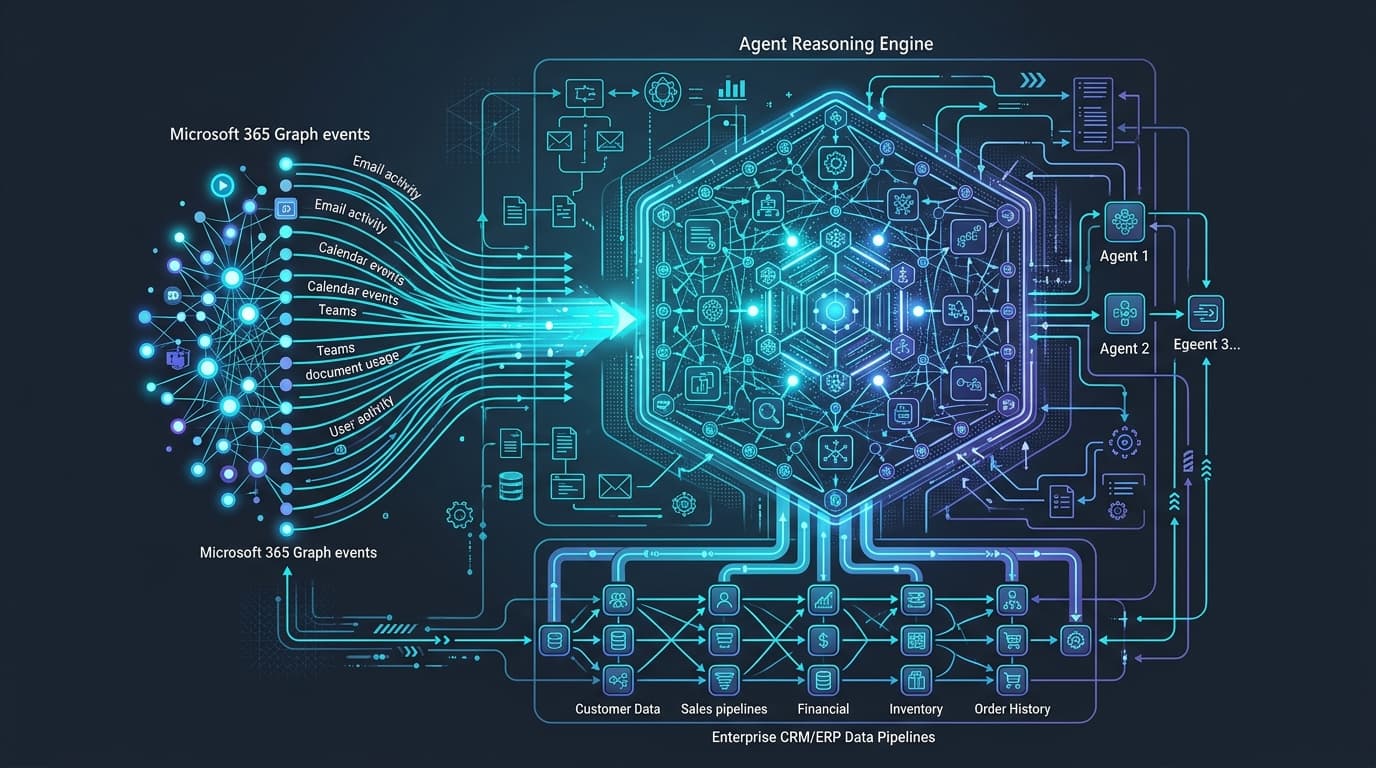
Agentic AI in Microsoft 365 replaces manual rep prompting with autonomous background workers that ingest signals from Outlook, Teams, and ERP databases to execute multi-step sales workflows independently. Instead of waiting for a sales representative to ask for a summary or manually update Salesforce, agentic architectures listen to calendar events, email threads, and CRM status changes to prepare briefings, generate quotes within pre-approved margin rules, and stage pipeline updates for one-click human approval.
For revenue operations leaders, the practical impact is a shift from reactive administrative data entry to proactive deal acceleration.
From Passive Chatbots to Autonomous Background Agents
The enterprise software landscape has crossed a definitive operational threshold. Where 2024 and 2025 were dominated by conversational chat assistants that required continuous manual prompting, 2026 marks the era of Agentic AI—autonomous systems capable of goal-directed execution across enterprise application ecosystems.
In Microsoft 365, agentic workflows execute multi-step tasks independently behind the scenes. Instead of asking a rep "How can I help you today?", background agents monitor email threads, calendar invites, and CRM updates to proactively conduct account research, draft responses, and trigger workflow automations.
How Agentic AI Operates in a Modern Revenue Engine
Trigger Recognition: An incoming email from an enterprise prospect requests detailed technical compliance specs and custom volume pricing.
Context Retrieval: The autonomous AI agent queries internal ERP records, historical CRM deal metrics, and competitive intelligence repositories.
Action Execution: The agent drafts a personalized response in Outlook, attaches verified technical documentation, updates the opportunity stage in Salesforce, and posts an interactive summary card to the deal's Microsoft Teams channel for rep approval.
Visual Step-by-Step Flow
Autonomous Agentic Sales Workflow
How background AI agents handle repetitive work from conversation to CRM
1Input
💬Customer Talk
Rep conducts call in Teams or sends follow-up email.
2Autonomous
🤖AI Analysis
Background agent extracts action items, pricing requests, and sentiment.
3Automation
📊Data Sync
Agent queries inventory/pricing and auto-updates CRM deal stage.
4Execution
✉️Draft & Alert
Rep gets a prepared proposal draft and channel alert in under 30 seconds.
Comparing Automation Architectures
Workflow Dimension
Traditional Rule-Based Automation
Conversational Chat Assistant
Agentic AI Autonomous Workflow
Trigger Mechanism
Fixed webhook or Zapier IF/THEN condition
User manually types a prompt
Context-aware intent detection across multi-modal data streams
Data Aggregation
Single-source database lookup
Searches local inbox/calendar
Multi-system reasoning across ERP, CRM, web scrapers & email history
Adaptability
Hardcoded logic breaks on layout changes
Follows prompt structure only
Dynamic plan formulation and self-correcting execution paths
The Enterprise Integration Stack: Microsoft 365 + AI Sales Intelligence
To deploy agentic workflows effectively, organizations need seamless orchestration between collaboration suites (Microsoft 365 / Teams) and enterprise core databases (SAP, Salesforce, Dynamics 365, HubSpot).
Rather than forcing account executives into standalone dashboards, modern integration architectures bridge collaboration tools with backend telemetry. For deeper architecture details, see our breakdown of the Microsoft Copilot for Sales 2026 roadmap.
3 High-Impact Use Cases for Revenue Teams
Autonomous Account Briefings: Prior to every executive call, the agent compiles a 1-page briefing card summarizing recent news, buyer executive shifts, product usage metrics, and relevant competitive win-loss insights.
Real-Time Objection Handling: During live video meetings in Microsoft Teams, the agent listens to the audio stream in real time, detecting competitor mentions and instantly surfacing verified counter-arguments on screen (explore our guide on AI sales intelligence tools for Microsoft Teams).
Post-Meeting Execution: Immediately after a call ends, the agent generates key takeaway summaries, updates CRM fields, creates task assignments in Microsoft Planner, and drafts follow-up emails for rep review.
Technical Architecture: Orchestrating Autonomous Agents in M365
Building reliable agentic workflows requires connecting Microsoft 365 Graph APIs with backend enterprise data structures.
Key Technical Prerequisites for Enterprise Rollout
Unified Schema Normalization: Standardize data types between SAP material numbers and Salesforce product SKUs so autonomous agents can cross-reference records accurately. Learn how leading teams approach this in our enterprise RevOps data unification guide.
Event-Driven Webhook Subscriptions: Utilize Microsoft Graph change notifications to trigger background agents within milliseconds of email or calendar event creation.
Fail-Safe Fallback Mechanisms: If an autonomous agent encounters ambiguous buyer requests or conflicting ERP inventory data, the workflow automatically routes the task to a human RevOps analyst with full context pre-populated.
When to Deploy Autonomous Agents vs. Simple Automation
Not every sales workflow warrants an agentic architecture. Understanding the tradeoffs prevents unnecessary complexity:
Rich cross-system synthesis; requires strict RBAC governance and schema validation
Balancing Autonomy with Enterprise Governance
While autonomous agents accelerate pipeline velocity, revenue operations leaders must establish clear organizational guardrails. In high-stakes enterprise sales, the primary objective of agentic AI is not to eliminate human judgment—it is to remove administrative and data-reconciliation friction so revenue professionals can focus their energy on strategic relationship building and deal execution.
Essential Governance Principles
Human-in-the-Loop Approval: Mandate human review for all outbound customer proposals involving discount rates above pre-set thresholds.
Role-Based Access Control (RBAC): Restrict autonomous agents from querying sensitive payroll, financial reporting, or unannounced product roadmap data.
Audit Trail Logging: Maintain immutable logs of every autonomous action executed across CRM, ERP, and email systems for compliance auditing.
Summary & Next Steps for Revenue Leaders
As enterprise sales operations transition into an autonomous era, organizations that pair Microsoft 365 collaboration tools with deep ERP intelligence platforms will dominate deal velocity. By automating routine administrative research and data synchronization, revenue teams reclaim valuable hours each week for genuine relationship building.
Microsoft has officially consolidated its enterprise AI roadmap into the unified 'AI at Work' agentic architecture. Explore how autonomous Sales Development Agents operate natively inside Outlook, Teams, and Dynamics 365.
Uncoordinated AI integrations frequently create conflicting CRM writes and pipeline reconciliation friction. Learn how enterprise RevOps leaders leverage hybrid reasoning architectures, deterministic schema validation, and dual-loop HITL controls to eliminate data collisions and stabilize forecasting.